We launched new forums in March 2019—join us there. In a hurry for help with your website? Get Help Now!
    • 28042 ☆ A M B ☆
    • 24,524 Posts
    Yes, that’s how the file manager is written. A custom module would need to be created with a multiple-upload feature if you want one in the Manager, or a snippet for uploading from a front-end page.

    My favorite multiple-upload script is Uploadify http://www.uploadify.com/
      Studying MODX in the desert - http://sottwell.com
      Tips and Tricks from the MODX Forums and Slack Channels - http://modxcookbook.com
      Join the Slack Community - http://modx.org
      • 29955
      • 9 Posts
      Hi,

      I used to use MODx Evolution on all my sites, but about a year ago I switched to WordPress.

      I am now trying to use Revolution, and although I have done a template that theoretically shows a greeting based on the time of day and which shows "Anonymous" for guests, and "User Name" for users who are logged in, I can’t login from the front end.

      I have a log-in box built into my template, but I don’t know what I am doing wrong. How do I use my custom log-in box to log-in? It seems that WebLogin PE was much easier to use.

      I should mention that I am not a PHP professional, I just ’hack’ the code. Any help would be greatly appreciated.

      Ok - I solved the problem about 10 minutes after posting this. Thanks!

      Ok - I
        • 20687
        • 3 Posts
        My first day at trying to use ModX, and I’m completely lost.

        I’ve used Wordpress a fair bit, but come from the old "create your website in Notepad" school.

        I’ve downloaded a template that I like, unzipped it and uploaded it to the templates folder, and can see the contents in the "Files" area in the ModX control panel but couldn’t work out how to install it.

        Looking at the instructions it says I need to create new chunks for the footer, menu and layout, so I’ve done that, and I’ve created a new template and copied the html code from the template info file into the new template.

        I’ve created a resource with a bit of text in it and told it to use the new template I’ve created, but the output, well, it just isn’t right.

        So, my questions...

        1. Is it always so difficult / long-winded to install templates? After Wordpress, I assumed this would have a similar "choose template">"install template">"done" situation, but I can’t work it out for the life of me.

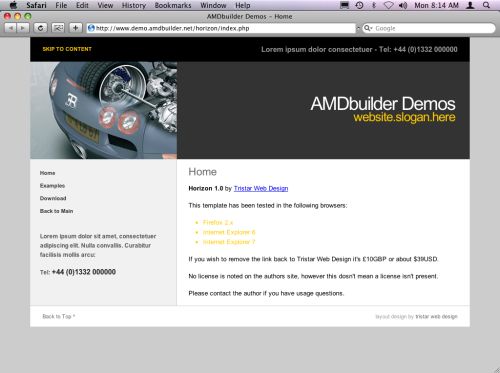
        2. Can someone please show me where I’m going wrong, because I’ve been banging my head against my monitor for hours now and all I’ve managed to output is this:


        The template definitely didn’t look like that in the advert.

          • 3749
          • 24,544 Posts
          I’m going to guess that you installed MODX Revolution, but are using instructions for MODX Evolution.

          The tag syntax has changed between the two, though the concepts are the same.

          For Revolution, it should be:

          [[++site_url]]
          
          [[!Wayfinder? &startId=`0`]] [[$horizon_contact]]
          [[$horizon_sidebar]]
          [[*content]]
          [[$horizon_footer]]


          There’s a summary of the old and new tag styles here: http://bobsguides.com/revolution-tags.html

          MODX is definitely more work to set up than WordPress because of MODX’s power and flexibility. That power and flexibility, though, makes it much easier to customize the site to meet your needs in MODX.

          Once you get used to it (and get the tags right wink ), it’s relatively easy to set up a new template.
          Welcome to MODX. smiley

            Did I help you? Buy me a beer
            Get my Book: MODX:The Official Guide
            MODX info for everyone: http://bobsguides.com/modx.html
            My MODX Extras
            Bob's Guides is now hosted at A2 MODX Hosting
            • 20687
            • 3 Posts
            Quote from: BobRay at Apr 04, 2011, 06:30 PM

            I’m going to guess that you installed MODX Revolution, but are using instructions for MODX Evolution.

            The tag syntax has changed between the two, though the concepts are the same.

            For Revolution, it should be:

            [[++site_url]]
            
            [[!Wayfinder? &startId=`0`]] [[$horizon_contact]]
            [[$horizon_sidebar]]
            [[*content]]
            [[$horizon_footer]]


            There’s a summary of the old and new tag styles here: http://bobsguides.com/revolution-tags.html

            MODX is definitely more work to set up than WordPress because of MODX’s power and flexibility. That power and flexibility, though, makes it much easier to customize the site to meet your needs in MODX.

            Once you get used to it (and get the tags right wink ), it’s relatively easy to set up a new template.

            Welcome to MODX. smiley


            Hi there, thanks for that, that’s great! And thanks for the swift reply!

            I now have a plain-text title and description on the page, but it’s still otherwise a blank page. How do I make the theme template actually "work" so that my site looks like the one in the sample picture on the page I downloaded it from?


            http://modx.com/extras/package/horizon
              • 3749
              • 24,544 Posts
              I’m assuming that you installed the template through Package Manager rather than just downloading it.

              Did you set the "Uses Template" field of the resource you’re working on to that template, then save it (the resource)?
                Did I help you? Buy me a beer
                Get my Book: MODX:The Official Guide
                MODX info for everyone: http://bobsguides.com/modx.html
                My MODX Extras
                Bob's Guides is now hosted at A2 MODX Hosting
                • 20687
                • 3 Posts
                Quote from: BobRay at Apr 05, 2011, 12:55 PM

                I’m assuming that you installed the template through Package Manager rather than just downloading it.

                Did you set the "Uses Template" field of the resource you’re working on to that template, then save it (the resource)?


                Actually, I downloaded it to my hard drive, unzipped it and then uploaded it with ftp to the templates folder manually.

                I couldn’t find this particular theme in the package manager.
                  • 3749
                  • 24,544 Posts
                  Ah . . . that would explain it. wink

                  In that case, you have to create a new template in the Manager and paste the template code into it. Then assign that template to any and all resources that should use it. You may also have to move other files it uses (e.g. CSS) to the correct locations (see where the template is looking for them).
                    Did I help you? Buy me a beer
                    Get my Book: MODX:The Official Guide
                    MODX info for everyone: http://bobsguides.com/modx.html
                    My MODX Extras
                    Bob's Guides is now hosted at A2 MODX Hosting
                    • 23782
                    • 3 Posts
                    How do I specify modx’s home page? E.g. I’d like my homepage visible at www.mydomain.org/ but currently I have to visit http://www.mydomain.org/modx-2.0.8-pl/index.php?id=21 to see it. Can anyone shed some light on this?
                      • 29955
                      • 9 Posts
                      Quote from: pp at Apr 08, 2011, 09:41 AM

                      How do I specify modx’s home page? E.g. I’d like my homepage visible at www.mydomain.org/ but currently I have to visit http://www.mydomain.org/modx-2.0.8-pl/index.php?id=21 to see it. Can anyone shed some light on this?

                      It looks like you’ve installed MODx in the default unzip folder and not your web root. Your web root should be something like public_html. If you see public_html/modx-2.0.8-pl then MODx is installed in the wrong place.

                      Your best option is to upload all the files to your root using FTP and then re-install. Otherwise, if you have cPanel, unzip the MODx zip file to a folder on your computer. Go to that folder and zip all the files without storing the paths. Then upload in the cPanel file manager and unzip (extract) in your root. Install as normal.