We launched new forums in March 2019—join us there. In a hurry for help with your website? Get Help Now!
    • 30223
    • 1,010 Posts
    Quote from: grass at Nov 02, 2006, 08:48 AM

    so.. there’s still no guide?
    And what guide would that be? huh
      • 25663 MODX Staff
      • 12,272 Posts
      According to the Guide, the answer is 42.
        Ryan Thrash, MODX Co-Founder
        Follow me on Twitter at @rthrash or catch my occasional unofficial thoughts at thrash.me
        • 7923
        • 4,213 Posts
        Guide to what? There is one general FURL guide in wiki..


          "He can have a lollipop any time he wants to. That's what it means to be a programmer."
          • 25737
          • 62 Posts
          I like the many other people out there am trying to get friendly URLs to work.

          Here is what I have done so far.

          1. Under Tools ---> Configuration ---> Friendly URLs
          - Friendly URLs: ON
          - Prefix for friendly URLs: page
          - Suffix for friendly URLs: .php
          - Use friendly aliases: NO
          - Use friendly alias path: NO
          - Allow duplicate aliases: NO
          - Automatically generate alias: NO

          2. Here is my current .htaccess file:

          RewriteEngine On

          RewriteCond %{REQUEST_FILENAME} !-f
          RewriteCond %{REQUEST_FILENAME} !-d

          RewriteRule ^(.*) /path/to/index.php?q=$1 [L,R=301,QSA]

          MODx is installed in my root directory. Please help.
            Faithfully using MODx since 2007!
            • 7923
            • 4,213 Posts
            Have you read http://wiki.modxcms.com/index.php/Friendly_URLs_Guide? if MODx is installed in site root, why you have some path before index.php?


              "He can have a lollipop any time he wants to. That's what it means to be a programmer."
              • 36805
              • 354 Posts
              Quote from: rthrash at Nov 02, 2006, 09:25 AM

              According to the Guide, the answer is 42.
              grin
                • 25663 MODX Staff
                • 12,272 Posts
                Finally, someone else loves Douglas. smiley
                  Ryan Thrash, MODX Co-Founder
                  Follow me on Twitter at @rthrash or catch my occasional unofficial thoughts at thrash.me
                  • 23491 ☆ A M B ☆
                  • 1,056 Posts
                  Maybe I’ve missed a really important thread, or there’s something in the works, but is there a solution yet for MODx aliasing w/ directories?

                  e.g.


                  OK... ideal setup:

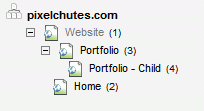
                  My "Portfolio" container is aliased as "portfolio"
                  I add a child to that node, and alias it appropriately as "child" (this could be something more common, such as "archive" and then "2006", etc)

                  I’d like to be able to browse to http://www.pixelchutes.com/portfolio/child but no dice.

                  What about aliasing as "portfolio/child" ? Nope. "/" is dropped, resulting in "portfoliochild"

                  C’mon, someone has to be doing this w/ MODx, ideally without having to manually update .htaccess, etc when you add containers...

                  [PLUGIN] SEO Strict URLs Beta seems to be the closest thing, but it doesn’t appear to be headed quite up this alley huh Hmmm, time to start some custom coding wink
                    Mike Reid - www.pixelchutes.com
                    MODx Ambassador / Contributor
                    [Module] MultiMedia Manager / [Module] SiteSearch / [Snippet] DocPassword / [Plugin] EditArea / We support FoxyCart
                    ________________________________
                    Where every pixel matters.
                    • 10487 MODX Staff
                    • 1,535 Posts
                    I’d like to be able to browse to http://www.pixelchutes.com/portfolio/child but no dice.
                    Hmm ... maybe I’m not following here but isn’t that what the Use Friendly Alias Path setting is for in MODx? Using that allows for friendly URLs as you described.
                      Garry Nutting
                      Senior Developer
                      MODX, LLC

                      Email: [email protected]
                      Twitter: @garryn
                      Web: modx.com
                      • 1932
                      • 137 Posts
                      Pixelchutes,

                      Go into Tools -> Configuration -> Friendly URLS

                      And enable "Use friendly alias path"

                      Setting this option to ’yes’ will display the full path to the document if the document has an alias. For example, if a document with an alias called ’child’ is located inside a container document with an alias called ’parent’, then the full alias path to the document will be displayed as ’/parent/child.html’.

                      This discussion is closed to further replies. Keep calm and carry on.