We launched new forums in March 2019—join us there. In a hurry for help with your website? Get Help Now!
    • 23491 ☆ A M B ☆
    • 1,056 Posts
    Quote from: TobyL at Feb 26, 2007, 05:53 PM

    Confirmed! In fact in my local working copy I had changed this to if( trim($value)!=’’ ) $validValues[] = $value; which basically does the same except for stripping whitespace chars.

    Time for a small incremental release I think. As soon as I find the time I’ll post an updated version.

    Wonderful!! Consider a new release a form of Moving-Out present ...for us! wink J/k

    Good luck with the move! We just hit the 6-month mark since our move last year.

    Some friendly advice:

    Do NOT leave the rental truck headlights running for a prolonged period of time.
    (You don’t want to have to call a tow truck @ 2AM because your car isn’t big enough to Jump Start the big rig smiley)
      Mike Reid - www.pixelchutes.com
      MODx Ambassador / Contributor
      [Module] MultiMedia Manager / [Module] SiteSearch / [Snippet] DocPassword / [Plugin] EditArea / We support FoxyCart
      ________________________________
      Where every pixel matters.
      • 23491 ☆ A M B ☆
      • 1,056 Posts
      OK, OK...count on me to point out something new...

      @TobyL, I know you’re moving and hope all goes well! Here’s a fun nugget to assist with once you return:

      Let’s say I have a multiple answer option that is type="text":

      <form method="get" action="test.html">
      	<input type="text" name="multi_test[]" />
      	<input type="text" name="multi_test[]" />
      	<input type="submit" />
      </form>
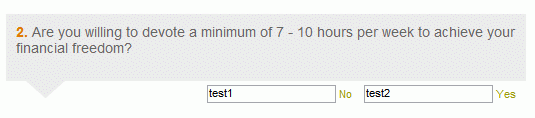


      Normally you wouldn’t have multiple answers of this Form input type, but in our case we do. To achieve this, we leverage the "[]" option at the end of the text name to associate the answer values back to the unique input name "multi_test"

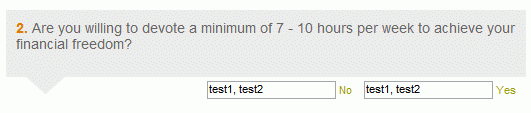
      The problem is that upon incomplete form submittal, the individual/unique values aren’t preserved, rather BOTH are present in each text field. (phew!...wordy.)

      Before Submit:


      After an Incomplete Form Submit:


      Any plans on having eForm properly handle multiple values for ALL input types? (e.g. Text)
        Mike Reid - www.pixelchutes.com
        MODx Ambassador / Contributor
        [Module] MultiMedia Manager / [Module] SiteSearch / [Snippet] DocPassword / [Plugin] EditArea / We support FoxyCart
        ________________________________
        Where every pixel matters.
        • 27889
        • 415 Posts
        Hi ,
        I have some remarks about this powerfull snippets (eform 1.4.3 MODx 0.9.5):

        1) be carreful, if you have a value which end or begin with a space the form won’t validate:
        [tt]<p><label for="test">Test label</label><input name="test" id="test" value="a space at the end of this value " type="radio" /></p>[/tt]

        2) In my list of checkbox, only the last item checked is returned in the report:
        <?php // only for highlighting
        <p><label for="delai1">Aucun</label><input name="delai" id="delai1" value="Aucun" type="checkbox" /></p>
        <p><label for="delai2">1 mois</label><input name="delai" id="delai2" value="Un mois" type="checkbox" /></p>
        <p><label for="delai3">2 mois</label><input name="delai" id="delai3" value="Deux mois" type="checkbox"  /></p> 
        <p><label for="delai4">6 mois</label><input name="delai" id="delai4" value="3 mois" type="checkbox" /></p>
        ?>

        If I check all these checkbox, only the last (3 mois) is returned, but with checkbox (no radio) input type, the choice could be multiple.
        I use [+delai+] in my report’s chunk. The same name for all the group is xhtml valid no ?, I could put different name but it isn’t fully semantic.
        Must I put some eform attribute to allow multiple choice ?

          MODx Sites & Prestations: http://dp-site.fr [Last MODx Site]
          MODx Repository: [HOME] [MetaTagsExtra] / Current Dev: [xFDM]
          • 10076
          • 1,024 Posts
          I get the same error Could not instantiate mail function I saw on page 6.
          I did not find a solution anywhere.

          Here some details:
          PHP Version 4.4.2
          Apache/2.0.46 (Red Hat)
          safe_mode_allowed_env_vars PHP_ PHP_
          safe_mode_protected_env_vars LD_LIBRARY_PATH LD_LIBRARY_PATH
          eForm vers 1.4.1
          Modx 0.9.5

          win XP sp 2
          ie7

          snippet call [!eForm? &formid=`FeedBackForm` &to=`[email protected]` &tpl=`eFeedBackForm` &report=`eFeedBackReport` &thankyou=`eFeedBackThanks` &mailselector=`department` &vericode=`1` &subject=`Web site feedback` !]

          I called al the chuncks in this way: FeedBackForm. So the first letters of every word part in capital. But had the error prior to changing that.

          Chunk s are pasted from the docs that came with the snippet.
          Any suggestions?


            • 23491 ☆ A M B ☆
            • 1,056 Posts
            Quote from: Frank at Mar 08, 2007, 10:48 AM

            I get the same error Could not instantiate mail function I saw on page 6.
            I did not find a solution anywhere.

            Here some details:
            PHP Version 4.4.2
            Apache/2.0.46 (Red Hat)
            safe_mode_allowed_env_vars PHP_ PHP_
            safe_mode_protected_env_vars LD_LIBRARY_PATH LD_LIBRARY_PATH
            eForm vers 1.4.1
            Modx 0.9.5
            ...

            Any suggestions?

            Well, unless you are tied to eForm 1.4.1, I might first suggest upgrading to newest version of eForm (1.4.3+), and then going from there...
              Mike Reid - www.pixelchutes.com
              MODx Ambassador / Contributor
              [Module] MultiMedia Manager / [Module] SiteSearch / [Snippet] DocPassword / [Plugin] EditArea / We support FoxyCart
              ________________________________
              Where every pixel matters.
              • 23491 ☆ A M B ☆
              • 1,056 Posts
              Quote from: Soda at Mar 08, 2007, 04:06 AM

              Hi ,
              I have some remarks about this powerfull snippets (eform 1.4.3 MODx 0.9.5):

              1) be carreful, if you have a value which end or begin with a space the form won’t validate:
              [tt]<p><label for="test">Test label</label><input name="test" id="test" value="a space at the end of this value " type="radio" /></p>[/tt]

              2) In my list of checkbox, only the last item checked is returned in the report:
              <?php // only for highlighting
              <p><label for="delai1">Aucun</label><input name="delai" id="delai1" value="Aucun" type="checkbox" /></p>
              <p><label for="delai2">1 mois</label><input name="delai" id="delai2" value="Un mois" type="checkbox" /></p>
              <p><label for="delai3">2 mois</label><input name="delai" id="delai3" value="Deux mois" type="checkbox"  /></p> 
              <p><label for="delai4">6 mois</label><input name="delai" id="delai4" value="3 mois" type="checkbox" /></p>
              ?>

              If I check all these checkbox, only the last (3 mois) is returned, but with checkbox (no radio) input type, the choice could be multiple.
              I use [+delai+] in my report’s chunk. The same name for all the group is xhtml valid no ?, I could put different name but it isn’t fully semantic.
              Must I put some eform attribute to allow multiple choice ?


              I think you might want to try changing the name to: delai[] for all multiple checkbox/radios...this solved similar problems for me in the past smiley Tells the PHP parser to associate all values to delai as an array, rather than overriding with the single, last submitted value.

              e.g.

              <?php // only for highlighting
              <p><label for="delai1">Aucun</label><input name="delai[]" id="delai1" value="Aucun" type="checkbox" /></p>
              <p><label for="delai2">1 mois</label><input name="delai[]" id="delai2" value="Un mois" type="checkbox" /></p>
              <p><label for="delai3">2 mois</label><input name="delai[]" id="delai3" value="Deux mois" type="checkbox"  /></p> 
              <p><label for="delai4">6 mois</label><input name="delai[]" id="delai4" value="3 mois" type="checkbox" /></p>
              ?>
                Mike Reid - www.pixelchutes.com
                MODx Ambassador / Contributor
                [Module] MultiMedia Manager / [Module] SiteSearch / [Snippet] DocPassword / [Plugin] EditArea / We support FoxyCart
                ________________________________
                Where every pixel matters.
                • 27889
                • 415 Posts
                Hummm I already tried this and it wasn’t work, but to be sure I made it again like you say and ... It’s working !
                I don’t know what I had forget. Thank you for your help, now my form is valid and semantic ( wink )

                Note: for the radio button I don’t need the array style, it’s working with the name only.

                Thank you again.
                  MODx Sites & Prestations: http://dp-site.fr [Last MODx Site]
                  MODx Repository: [HOME] [MetaTagsExtra] / Current Dev: [xFDM]
                  • 10076
                  • 1,024 Posts
                  Quote from: pixelchutes at Mar 08, 2007, 10:53 AM

                  Quote from: Frank at Mar 08, 2007, 10:48 AM

                  I get the same error Could not instantiate mail function I saw on page 6.
                  I did not find a solution anywhere.

                  Here some details:
                  PHP Version 4.4.2
                  Apache/2.0.46 (Red Hat)
                  safe_mode_allowed_env_vars PHP_ PHP_
                  safe_mode_protected_env_vars LD_LIBRARY_PATH LD_LIBRARY_PATH
                  eForm vers 1.4.1
                  Modx 0.9.5
                  ...

                  Any suggestions?

                  Well, unless you are tied to eForm 1.4.1, I might first suggest upgrading to newest version of eForm (1.4.3+), and then going from there...

                  That worked. Only in the previous set-up I did not usethe choice menu. Now I did not yet delete these lines

                  <p><label accesskey="s" for="department">Subject</label>
                  <select name="department">
                  <option value="1">Website feedback</option>
                  <option value="2">Support request</option>
                  <option value="3">Feature request</option>
                  </select></p>


                  and this one fromthe call:
                  &mailselector=`department`

                  Could this be the cause of the error. Can just delete these lines or do I have to use a diff way for not using this option?
                    • 25737
                    • 62 Posts
                    My form doesn’t work, can someone please help?? Im using Eform version 1.41

                    Heres what im using to call out the form:

                    [!eForm? &formid=`Qualify` &report=`QualifyReport` &to=`[email protected]` &tpl=`Qualify` &category=`Contact Requests` &format=`fname:First Name:string:1,lname:Last Name:string:1,pnumber:Phone Number:string:1,fnumber:Fax Number:string:1,contact-method:Contact Method:string:1,contact-time:Contact Time:string:1,contact-state:Contact State:string:1,email:Email:email:1,message:Message:html:1`!]


                    Here is the form script:

                    <p>[+validationmessage+]</p>
                    <form action="[~[*id*]~]" method="post" name="EmailForm" >
                    <fieldset>
                    <input name="formid" type="hidden" value="ContactForm" />
                    <label>* indicates a required field</label>


                    <label>First Name *:
                    <input name="fname" type="text" value="" eform="Your First Name::1:" />
                    </label>


                    <label>Last Name *:
                    <input name="lname" type="text" value="" eform="Your Last Name::1:" />
                    </label>


                    <label>Phone Number *:</label>
                    <input name="pnumber" type="text" value="" eform="Your Phone Number::1:" />


                    <label>Fax Number:</label>
                    <input name="fnumber" type="text" value="" eform="Your Fax Number::1:" />


                    <label>Email *:</label>
                    <input name="email" type="text" value="" eform="Your Email::1:" />


                    <select name="contact-method" eform="Contact Method::1:">
                    <option selected="selected">Preferred Contact Method</option>
                    <option value="Email">Email</option>
                    <option value="Phone">Phone</option>
                    <option value="Fax">Fax</option>
                    </select>


                    <select name="contact-time" eform="Time::1:">
                    <option selected="selected">Preferred Contact Time</option>
                    <option value="Email">Morning</option>
                    <option value="Phone">Afternoon</option>
                    <option value="Fax">Evening</option>
                    <option value="Fax">Anytime</option>
                    </select>


                    <select name="contact-state"eform="State::1:">
                    <option selected="selected">Property Location</option>
                    <option value="AL">Alabama</option><option value="AK">Alaska</option><option value="AZ">Arizona</option><option value="AR">Arkansas</option><option value="CA">California</option><option value="CO">Colorado</option><option value="CT">Connecticut</option><option value="DE">Delaware</option><option value="DC">District of Columbia</option><option value="FL">Florida</option><option value="GA">Georgia</option><option value="HI">Hawaii</option><option value="ID">Idaho</option><option value="IL">Illinois</option><option value="IN">Indiana</option><option value="IA">Iowa</option><option value="KS">Kansas</option><option value="KY">Kentucky</option><option value="LA">Louisiana</option><option value="ME">Maine</option><option value="MD">Maryland</option><option value="MA">Massachusetts</option><option value="MI">Michigan</option><option value="MN">Minnesota</option><option value="MS">Mississippi</option><option value="MO">Missouri</option><option value="MT">Montana</option><option value="NE">Nebraska</option><option value="NV">Nevada</option><option value="NH">New Hampshire</option><option value="NJ">New Jersey</option><option value="NM">New Mexico</option><option value="NY">New York</option><option value="NC">North Carolina</option><option value="ND">North Dakota</option><option value="OH">Ohio</option><option value="OK">Oklahoma</option><option value="OR">Oregon</option><option value="PA">Pennsylvania</option><option value="RI">Rhode Island</option><option value="SC">South Carolina</option><option value="SD">South Dakota</option><option value="TN">Tennessee</option><option value="TX">Texas</option><option value="UT">Utah</option><option value="VT">Vermont</option><option value="VA">Virginia</option><option value="WA">Washington</option><option value="WV">West Virginia</option><option value="WI">Wisconsin</option><option value="WY">Wyoming</option>
                    </select>


                    <textarea name="message" onfocus="clearText(this)" onblur="replaceText(this)" rows="7" cols="15" eform="Message:textarea:1">Message</textarea>


                    <input name="Submit" class="submit" type="submit" value="" id="cfContact" />
                    </fieldset>
                    </form>

                    Here is the report:

                    <p>This is a response sent by <b>[+Name+]</b> using the feedaback form on the website. The details of the mesage follow below:</p>


                    <p>First Name: [+fname+]</p>
                    <p>Last Name: [+lname+]</p>
                    <p>Last Name: [+pnumber+]</p>
                    <p>Last Name: [+fnumber+]</p>
                    <p>Email: [+email+]</p>
                    <p>Preferred Contact Method: [+contact-method+]</p>
                    <p>Preferred Contact Time: [+contact-time+]</p>
                    <p>Property Location: [+contact-state+]</p>
                    <p>comments:
                    [+message+]</p>

                    <p>You can use this link to reply: <a href="mailto:[+email+]?subject=RE: [+subject+]">[+email+]</a></p>
                      Faithfully using MODx since 2007!
                      • 23491 ☆ A M B ☆
                      • 1,056 Posts
                      Quote from: runningthingz at Mar 11, 2007, 04:41 PM

                      My form doesn’t work, can someone please help?? Im using Eform version 1.41

                      I think this might be the issue:

                      Per the
                      &formid=`Qualify`
                      in your eForm snippet call, eForm is looking for a <form> tag with the id of "Qualify" or a hidden form field named formid, only with "[b]Qualify[b]" as the value.

                      I would change this:

                      <form action="[~[*id*]~]" method="post" name="EmailForm"  >
                            <fieldset>
                            <input name="formid" type="hidden" value="ContactForm" />
                      

                      to this:
                      <form action="[~[*id*]~]" method="post" name="EmailForm" id="Qualify">
                            <fieldset>
                      

                      ...and see if that does the trick...
                        Mike Reid - www.pixelchutes.com
                        MODx Ambassador / Contributor
                        [Module] MultiMedia Manager / [Module] SiteSearch / [Snippet] DocPassword / [Plugin] EditArea / We support FoxyCart
                        ________________________________
                        Where every pixel matters.

                      This discussion is closed to further replies. Keep calm and carry on.