We launched new forums in March 2019—join us there. In a hurry for help with your website? Get Help Now!
    • 23491 ☆ A M B ☆
    • 1,056 Posts
    Hello all!

    This is the first time I’ve posted a site in this section, so be gentle! wink

    Root site: http://www.teethwhiteningsmiles.com
    Product page example: Custom Fit Teeth Whitening System

    ...has just been re-launched with a complete make-over, more content, more items, and super-fresh CMF (MODx) to make it all possible!

    I tried aiming to keep the design simple here, hopefully not too simple. I’m sure a few of the pages couldn’t hurt to have a bit of color (images) splashed on them, but we’ll see wink

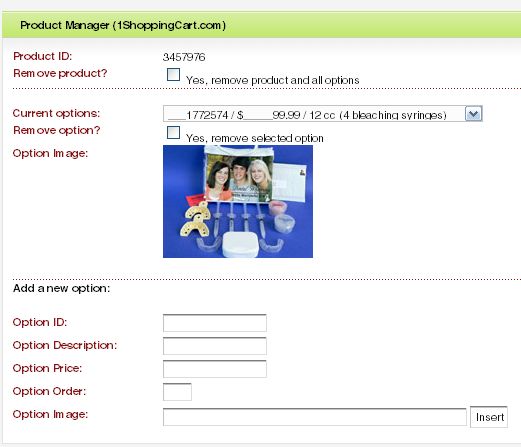
    This was a new implementation for me, as I wrote a pretty cool plugin for hi-jacking the "Edit Document" page by injecting some custom "Product Information" fields and submission management logic. All product fields (large image, image, thumbnail, price, sale price, options, etc) are stored in a custom MySQL table, all tied back to the document_id you are editing. It’s a seamless integration into the MODx framework, and is nice because you don’t have to go to a separate Module section to manage the product you’re already editting! Very cool.

    Custom management section screen shot:


    Any feedback is greatly appreciated! Thanks.
      Mike Reid - www.pixelchutes.com
      MODx Ambassador / Contributor
      [Module] MultiMedia Manager / [Module] SiteSearch / [Snippet] DocPassword / [Plugin] EditArea / We support FoxyCart
      ________________________________
      Where every pixel matters.
      • 10473
      • 44 Posts
      Cool looking site. Unfortunately, I’m British, and will therefore never buy any dental hygiene products more complicated than toothpaste.
        • 29181
        • 480 Posts
        Tidy!

        The idea of such a plugin sounds great. I could have used something like that for the kalender snippet to make it a little easier for clients to add new events and get an understanding for how a new document is actually an event, and other things like that. In the end I used HideManagerFields which achieved that aim to a degree I (and the client) could live with. Is your plugin up for grabs? I would like to see how one would go about doing something like that. I’m sure it would be useful in the future.

        All the best,
        Taff
          Adrian Lawley: www.adrianlawley.com
          • 23491 ☆ A M B ☆
          • 1,056 Posts
          Quote from: Taff at Apr 26, 2007, 01:37 AM

          Tidy!

          The idea of such a plugin sounds great. I could have used something like that for the kalender snippet to make it a little easier for clients to add new events and get an understanding for how a new document is actually an event, and other things like that. In the end I used HideManagerFields which achieved that aim to a degree I (and the client) could live with. Is your plugin up for grabs? I would like to see how one would go about doing something like that. I’m sure it would be useful in the future.

          All the best,
          Taff

          Taff,

          Once I have a free moment, I’ll see if I can’t put together a little something!
            Mike Reid - www.pixelchutes.com
            MODx Ambassador / Contributor
            [Module] MultiMedia Manager / [Module] SiteSearch / [Snippet] DocPassword / [Plugin] EditArea / We support FoxyCart
            ________________________________
            Where every pixel matters.
            • 14050
            • 788 Posts
            Site looks great. One suggestion though. I think that when a customer hits the "Continue Shopping" button that it should take them back to the "catalog." When I press it, it just reloads my current page, which is always "my cart" at the time.
              Jesse R.
              Consider trying something new and extraordinary.
              Illinois Wine

              Have you considered donating to MODx lately?
              Donate now. Every contribution helps.
              • 23491 ☆ A M B ☆
              • 1,056 Posts
              Quote from: jesster444 at Apr 26, 2007, 08:58 AM

              Site looks great. One suggestion though. I think that when a customer hits the "Continue Shopping" button that it should take them back to the "catalog." When I press it, it just reloads my current page, which is always "my cart" at the time.

              @jesster444,

              You’re totally right. Unfortunately, the mash-up between MODx and 1shoppingcart.com requires that I load the Cart system within a transparent IFRAME... Because of this, and the way 1shoppingcart.com works, I can only define a URL, not a target. Meaning that if I did define the catalog page, it would reload the ENTIRE site within the IFRAME itself. sad So, to combat this, I had actually already added a Continue Shopping hyperlink directly above the cart section, visible throughout the entire checkout process.

              As for the checkout "BUTTON", I figured I could do 2 things:

              1. Redirect to a page within my site with JavaScript to then REDIRECT (target = _top) to the catalog. Downside of this is that it now would take 2 Requests to the server just to get to catalog, not to mention the dependency it puts on having JavaScript enabled.

              2. Since I couldn’t directly reference the "Continue Shopping" button individually (possibly for HIDING via CSS), I could set the URL to the current page (as it is meant for display within an IFRAME already...)

              ...Now that I think about it, I may have thought of a way to inject some javascript to directly manipulate the button to either be hidden, or to possibly modify its default behavior to something more desirable. The catch is that the JS would have to be served from an HTTPS protocol (which is what I’m doing with the CSS).

              Thanks for the feedback, I won’t give up just yet wink
                Mike Reid - www.pixelchutes.com
                MODx Ambassador / Contributor
                [Module] MultiMedia Manager / [Module] SiteSearch / [Snippet] DocPassword / [Plugin] EditArea / We support FoxyCart
                ________________________________
                Where every pixel matters.
                • 14050
                • 788 Posts
                A few more things. In IE6, on the product pages, the right column gets pushed below all the content (Screen shot attached).

                Also, the headers for each of the content boxes on the catalog page are doing funky things, at least in IE6. They disappear and then reappear when scrolled off the viewport and back on. In the first screen shot it "How it works" header is gone completely, but when I scroll back up, it is shown, but not properly, and now look at the "Impression" header in the second screen shot.
                  Jesse R.
                  Consider trying something new and extraordinary.
                  Illinois Wine

                  Have you considered donating to MODx lately?
                  Donate now. Every contribution helps.
                  • 23491 ☆ A M B ☆
                  • 1,056 Posts
                  Quote from: jesster444 at Apr 26, 2007, 12:00 PM

                  A few more things. In IE6, on the product pages, the right column gets pushed below all the content (Screen shot attached).

                  Dang, I totally forgot about that one! I noticed the column behavior getting pushed, but it was on the home page...after I had it corrected, and saw it wasn’t pushed on the home page in IE6, I assumed all was well. I will need to put even MORE time to ensuring IE6 is up to par...Thanks, M$.

                  As for the header-display bug, I’m hoping that I can figure it out... I did witness the anomaly once before (during a brief IE6-review) but the behavior was so weird (as you described) that I assumed it was my PC acting up! lipsrsealed

                  Really, thank you for the feedback. Looks like back to the drawing board... *sigh*
                    Mike Reid - www.pixelchutes.com
                    MODx Ambassador / Contributor
                    [Module] MultiMedia Manager / [Module] SiteSearch / [Snippet] DocPassword / [Plugin] EditArea / We support FoxyCart
                    ________________________________
                    Where every pixel matters.
                    • 4971
                    • 964 Posts
                    Nice and clean site pixelchute...

                    One thing I noticed was that when you go to checkout, after the Paypal option,
                    the prices of the products are in the descriptions instead of appearing in the
                    boxes... the addition of all product prices is still right but it seems that it was
                    just a placing error...

                    nice integration of 1shoppingcart with MODx...
                      Website: www.mercologia.com
                      MODX Revo Tutorials:  www.modxperience.com

                      MODX Professional Partner
                      • 29181
                      • 480 Posts
                      Quote from: pixelchutes at Apr 26, 2007, 07:44 AM

                      Quote from: Taff at Apr 26, 2007, 01:37 AM

                      Tidy!

                      The idea of such a plugin sounds great. I could have used something like that for the kalender snippet to make it a little easier for clients to add new events and get an understanding for how a new document is actually an event, and other things like that. In the end I used HideManagerFields which achieved that aim to a degree I (and the client) could live with. Is your plugin up for grabs? I would like to see how one would go about doing something like that. I’m sure it would be useful in the future.

                      All the best,
                      Taff

                      Taff,

                      Once I have a free moment, I’ll see if I can’t put together a little something!

                      Thanks, I’ll look forward to that
                        Adrian Lawley: www.adrianlawley.com