How to serve up both HTTP and HTTPS pages and still take advantage of the nice MODX link building shortcuts and menu builders (like Wayfinder):
I have a site that uses the HTTP scheme, but has certain pages that need the HTTPS scheme (login, registration, member pages, etc.). My conundrum was how to do that and be able to use the nice MODX'y tools, and across multiple contexts to boot. I did not want the entire site to be fully HTTP or HTTPS.
The solution I came up with is elegant (in my humble opinion), not complicated, and it works great! The keys are:
- Using a scheme-independent value for the site_url setting (e.g. "//examplesite.com/").
- Setting a Template variable which contains the value of the page scheme ("http:" or "https:").
- Writing a MakeURL-like snippet which can generate full URL resource links based on the scheme template variable.
- Creating and utilizing custom Tpl chunks for Wayfinder and other snippets that incorporate the scheme template variable.
It requires no special changes to the .htaccess file.
1. Set the site_url setting
//examplesite.com/
or
//{http_host}/
Do this in System->System settings. And it works over multiple contexts when it's defined as a context setting for each context. For example, if you have a multi-language Babel site, you'll define a different site_url for each language (each with their own context).
2. Create a TV called page-scheme containing the value of the scheme for the resource
 General Information tab:
- Name:
page-scheme
- Caption:
HTTP or HTTPS scheme
- Description:
Select the scheme for how this page is accessed
 Input Options tab:
- Input Type
Listbox (Single-Select)
- Input Option Values
http:||https:
- Default Value
http:
- Allow Blank:
No
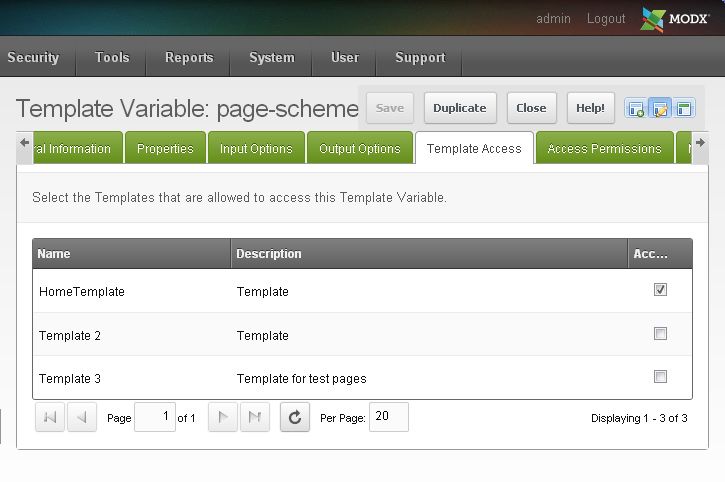 Template Access tab:
- Select the templates for which you will be using HTTP or HTTPS. It should be all the templates - disregard my bad example.
Now,
SAVE the TV.
3. Create a snippet (myMakeUrl) to build URL
Name the snippet myMakeUrl
Paste the following code:
/**
 * myMakeUrl
 *
 * DESCRIPTION
 *
 * Snippet used to display URL for a given resource ID. Replaces the ~ (e.g. [[~23]]) operator.
 *
 * For SSL-enabled sites that use both http: and https:. For example, a site that uses
 * http: throughout but has certain secure pages that use https:
 *
 * PROPERTIES:
 *
 * &id - integer optional. Resource ID to display. Default is resource ID for current document.
 * &scheme - string optional. Values are:
 *       *not specified* or '' - displays URL relative to site base
 *       'full' - displays full URL with scheme for the resource based on page-scheme TV.
 *       'fullSans' - displays full URL sans scheme
 *       'abs' - URL is absolute, prepended with base_url
 *       'http' - Use http: as the scheme
 *       'https' - Use https: as the scheme
 *
 * USAGE:
 *
 * [[myMakeUrl]]                             : this resource ("thisfile.html")
 * [[myMakeUrl? &scheme=`full`]]             : this resource full ("http://example.com/thisfile.html")
 * [[myMakeUrl? &id=`5`]]                    : specified resource ("somefile.html")
 * [[myMakeUrl? &id=`5` &scheme=`full`]]     : full url ("http://example.com/somefile.html")
 * [[myMakeUrl? &id=`5` &scheme=`fullSans`]] : full sans scheme ("//example.com/somefile.html")
 * [[myMakeUrl? &id=`5` &scheme=`abs`]]      : absolute url ("/somefile.html")
 * [[myMakeUrl? &id=`5` &scheme=`http`]]     : full url ("http://example.com/somefile.html")
 * [[myMakeUrl? &id=`5` &scheme=`https`]]    : full url ("https://example.com/somefile.html")
 *
 * DEPENDENCIES:
 *
 * page-scheme - a template variable which contains the value "http:" or "https:"
 * site_url - expects the system or context setting "site_url" to be specified without a scheme.
 *            (e.g. "//example.com/" or "//{http_host}/"
 *
 *
 * VERSION HISTORY:
 *    v1.1   May 1, 2014     : Removed extraneous lines of code
 *    v1.0   April 30, 2014
 *
 * DEVELOPED BY: Paul Kabotie, KSOFTTECH, Inc.
 *
 */

$id = (int) $modx->getOption('id', $scriptProperties, $modx->resource->id);
$scheme = strtolower(trim($modx->getOption('scheme', $scriptProperties, '')));

// Initialize
$resourcescheme = 'http:';

// Figure out the scheme for any of the URL's that need it
if ($scheme == 'http' || $scheme === "0") {
    $resourcescheme = 'http:';
    $scheme = 'full';
}
elseif ($scheme == 'https' || $scheme === "1") {
    $resourcescheme = 'https:';
    $scheme = 'full';
}
elseif ($scheme == 'full') {
    // Check the scheme for the resource and change it if necessary
    $resource = $modx->getObject('modResource', $id);
    $resourcescheme = ($resource->getTVValue('page-scheme') == 'https:' ? 'https:' : 'http:');
}

// Now build the link. Use the modx system "makeUrl" method
if ($scheme == 'full') {
    $url = $resourcescheme . $modx->makeUrl ($id, '', '', 'full');
}
elseif ($scheme == 'fullsans') {
    $url = $modx->makeUrl ($id, '', '', 'full');
}
elseif ($scheme == 'abs') {
    $url = $modx->makeUrl ($id, '', '', 'abs');
}
else {
    $url = $modx->makeUrl ($id);
}

return $url;
And,
THAT'S IT! You are ready to roll.
Set the
page-scheme TV to "https" for any resources that need to be secure.
Use myMakeUrl throughout the site instead of using the [[~XX]] snippet. Some example calls are listed here:
[[myMakeUrl]] : this resource ("thisfile.html")
[[myMakeUrl? &scheme=`full`]] : this resource full ("http://example.com/thisfile.html")
[[myMakeUrl? &id=`5`]] : specified resource ("somefile.html")
[[myMakeUrl? &id=`5` &scheme=`full`]] : full url ("http://example.com/somefile.html")
[[myMakeUrl? &id=`5` &scheme=`fullSans`]] : full sans scheme ("//example.com/somefile.html")
[[myMakeUrl? &id=`5` &scheme=`abs`]] : absolute url ("/somefile.html")
[[myMakeUrl? &id=`5` &scheme=`http`]] : full url ("http://example.com/somefile.html")
[[myMakeUrl? &id=`5` &scheme=`https`]] : full url ("https://example.com/somefile.html")
What about Wayfinder?
For Wayfinder and other similar snippets that build resources URLs and utilize "Tpl" chunks, we need to provide alternate Tpl chunks that incorporate the
page-scheme TV.
The default WayFinder rowTpl chunk can be substituted. Create a chunk called myWayfinderRowTpl with the following Chunk Code:
myWayfinderRowTpl
<li[[+wf.id]][[+wf.classes]]><a href="[[+page-scheme]][[+wf.link]]" title="[[+wf.title]]" [[+wf.attributes]]>[[+wf.linktext]]</a>[[+wf.wrapper]]</li>
Then call Wayfinder and explicitly pass the Tpl. Be sure to specify &scheme=`full`. Wayfinder should work like a charm!
[[Wayfinder? &startId=`0` &scheme=`full` &rowTpl=`myWayfinderRowTpl`]]
Header BASE tag
<base href="[[*page-scheme]][[++site_url]]" />
Header CANONICAL tag
<link rel="canonical" href="[[myMakeUrl? &scheme=`full`]]" />
Scheme agnostic link examples (use with CSS, JS or image files)
<link rel="stylesheet" type="text/css" href="//[[++http_host]]/assets/css/cssfile.css" />
<link rel="stylesheet" type="text/css" href="[[myMakeUrl? &id=`5` &scheme=`fullSans`]]" />
<img title="title" alt="alt" src="//[[++http_host]]/assets/images/imagefile.jpg" />
If you're building a site with secure pages, I hope you find this helpful. Cheers!
[ed. note: ksofttech last edited this post 12 years, 5 months ago.]

 ☆ A M B ☆