We launched new forums in March 2019—join us there. In a hurry for help with your website? Get Help Now!
    • 19389
    • 11 Posts
    I am trying to build a multilingual site with 2 CSS Resource in Revo (localy with Xampp).
    There is a problem with changing the default output of the TVs (in a Resource) that are supposed to change parts of the CSS.

    I created a normal multilingual site and followed these instructions http://www.class-zec.com/en/blog/2011/seo-friendly-multilingual-websites-with-modx-and-babel.html.

    After making 2 Contexts for german and english pages (web, en), creating the "BabelGateway" Plugin, and changing the .htaccess I created 2 CSS Resources.


    "BabelGateway" Plugin:
    <?php
    if($modx->context->get('key') != "mgr"){
        /* grab the current language from the cultureKey request var */
        switch ($_REQUEST['cultureKey']) {
            case 'en':
                /* switch the context */
                $modx->switchContext('en');
                break;
            default:
                /* Set the default context here */
                $modx->switchContext('web');
                break;
        }
        /* unset GET var to avoid
         * appending cultureKey=xy to URLs by other components */
        unset($_GET['cultureKey']);
    }?



    .htaccess changes:
    # The Friendly URLs part
    # RewriteCond %{REQUEST_FILENAME} !-f
    # RewriteCond %{REQUEST_FILENAME} !-d
    # RewriteRule ^(.*)$ index.php?q=$1 [L,QSA]
    
    # The new Friendly URLs part for Babel 2.2
    # detect language when requesting the root (/)
    RewriteCond %{HTTP:Accept-Language} !^de [NC]
    RewriteRule ^$ en/ [R=301,L]
    RewriteRule ^$ de/ [R=301,L]
     
    # redirect all requests to /en/favicon.ico and /de/favicon.ico
    # to /favicon.ico
    RewriteCond %{REQUEST_FILENAME} !-d
    RewriteCond %{REQUEST_FILENAME} !-f
    RewriteRule ^(en|de)/favicon.ico$ favicon.ico [L,QSA]
     
    # redirect all requests to /en/apple-touch-icon.png and /de/apple-touch-icon.png
    # to /favicon.ico
    RewriteCond %{REQUEST_FILENAME} !-d
    RewriteCond %{REQUEST_FILENAME} !-f
    RewriteRule ^(en|de)/apple-touch-icon.png$ apple-touch-icon.png [L,QSA]
     
    # redirect all requests to /en/assets* and /de/assets* to /assets*
    RewriteCond %{REQUEST_FILENAME} !-d
    RewriteCond %{REQUEST_FILENAME} !-f
    RewriteRule ^(en|de)/assets(.*)$ assets$2 [L,QSA]
     
    # redirect all other requests to /en/* and /de/*
    # to index.php and set the cultureKey parameter
    RewriteCond %{REQUEST_FILENAME} !-f
    RewriteCond %{REQUEST_FILENAME} !-d
    RewriteRule ^(en|de)?/?(.*)$ index.php?cultureKey=$1&q=$2 [L,QSA]


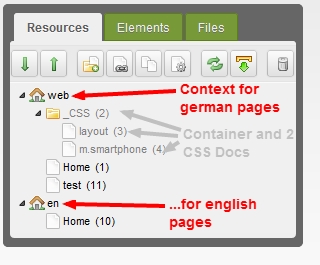
    Contexts and CSS Resources:


    I then created multiple TVs for changing parts of the CSS Resources... for example for the default Font:
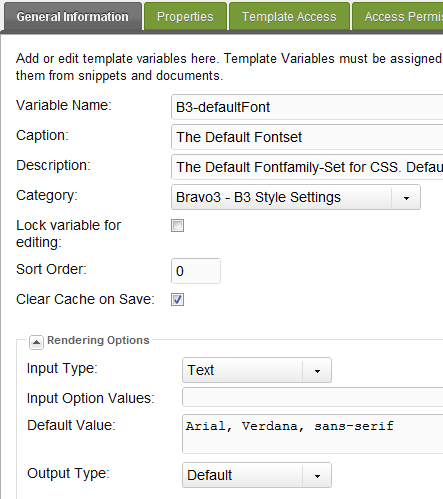
    Template Access is checked.


    When I want to change the Value in ’Home’ Resource, it shows me the Default Value as expected...

    ...but changing the Value doesn’t do anything...
    When I look at the site it still outputs the default value.


    I tested the TV by placing it somewhere in the Template just to see what it spits out... and there, it showed me the modified value.
    Could this possibly be a bug or did I miss something here? the site works without any problems... only I can’t seem to change the TVs for the CSS Resources.
    Did anyone have similar Problems and how can I fix this? Help is much appreciated.

    --------------
    MODx Revolution 2.0.7-pl (traditional)
    XAMPP 1.7.3 (PHP 5.3.1, mysql 5.1.41)
      • 19389
      • 11 Posts
      Can’t anyone help me out with this? I still waasn’t able to fix the Problem. sad
      I’d like to use the ability of creating dynamic CSS Resources but it seems not to work here.
        • 21635
        • 81 Posts
        For what i know, Babel does only copy the TV-Values, when you assign the Babel-Link between the two resources (creating the connection between two resources)? No?
          • 19389
          • 11 Posts
          Yes I linked the relevant TVs, but it still doesn’t seem to solve the problem.

          Changing the default value still only works directrly in the doc...
          If I put the TV directly into the template just to test the output, it gives me the changed value (it outputs ’Helvetica’)
          <!-- Default:Arial, verdana, sans-serif. Changed to: Helvetica -->
          <p style="font:[[*B3-defaultFont]]">TESTESTEST</p>


          Putting it in the CSS Resource (in _CSS/layout) doesn’t change the Default value (it outputs ’Arial, verdana, sans-serif’)
          /*Default:Arial, verdana, sans-serif. Changed to: Helvetica*/
          p{
             font:[[*B3-defaultFont]];
          }
          
            • 19389
            • 11 Posts
            Alright, I don’t know if anyone knew about this here, but TVs don’t work on Resources which don’t use any Templates
            (like CSS Resources -> "Uses Template: empty").

            This kind of bugs me a little since I was hoping to make the CSS "dynamic". Is there a workaround of some sort to do this or am i stuck with only able to change inline styles (which are then directly in the template)?
              • 21635
              • 81 Posts
              Alright, I don’t know if anyone knew about this here, but TVs don’t work on Resources which don’t use any Templates
              (like CSS Resources -> "Uses Template: empty").

              Well, okay, that was the problem. Yes, TVs are always assigned via Templates.
              It is not really a good practice to work with empty templates.

              Rather, create a new template, call it "CSS" and just put

              [[*content]]


              in it. That should do the trick.
                • 19389
                • 11 Posts
                huh... tongue

                If I only knew... rolleyes

                Great, this did the trick.
                Thanks a bunch!
                  • 21635
                  • 81 Posts
                  you’re welcome!
                  i also learned modx through this forum, so i’ll give back. cheers! smiley
                    • 19389
                    • 11 Posts
                    someone should put this to the RTFM...

                    alot of things here should be there anyways. searching the numerous pages in a forum is not a very "elegant" way to discover (new) tricks/methods.
                      • 19389
                      • 11 Posts
                      Sorry to dig this up again but I’ll have to correct my last reply about the fact that it worked... well I didn’t check my code and made the mistake of leaving an inline CSS with a TV in there.

                      Long story short: It was the Inline CSS with TVs that worked... not the external CSS with TVs.
                      So the problem still excist.

                      All CSS Resources have their Template called "_dyamic resources" (instead of empty).
                      "_dyamic resources" only has [[*content]] in it.
                      In my normal Template in <head></head> I linked the CSS Resource accordingly:
                      <link rel="stylesheet" href="[[~3]]?v=1">


                      I don’t understand what I am doing wrong. sad
                      Can anyone help?