We launched new forums in March 2019—join us there. In a hurry for help with your website? Get Help Now!
    • 30319
    • 406 Posts
    So far as I can see, all the new TinyMCE settings in 1.0.3 add things to which users should *not* access or remove things to which users *should* have access.

    I particularly need the ’AA’ icon for editing styles to remain grayed out or unavailable.

    1.0.2 had a really good ’Content Editor’ theme for TinyMCE that I wish to reproduce.

    Thankfully the ’MODx Style’ is a good start for what I need, I can customize this...

    Please indicate where is the documentation about how to fix/customize TinyMCE.

    Thank you, Tom
      • 10699
      • 15 Posts
      Hi Tom

      As far as I am aware, it has only ever been possible to edit the custom theme for TinyMCE... all of the other themes are hard-coded into the plugin.

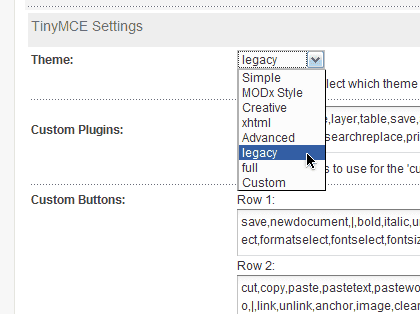
      Basically, you need to select the custom theme in manager->tools->configuration->interface & features->TinyMCE Settings
      Then modify the entries in "Custom Plugins" and "Custom Buttons" to suit your preferences.

      You can find documentation for the buttons in TinyMCE here:
      http://wiki.moxiecode.com/index.php/TinyMCE:Control_reference

      Hope this helps

      Gerard

      PS: Remove styleprops from the custom buttons field to hide the "AA" icon
        • 33014 ☆ A M B ☆
        • 1,231 Posts


        http://code.google.com/p/modx-ja/downloads/detail?name=tinymce332p3.zip
        try overwrite this.

        added legacy and full option
        expand custom fields
          • 30319
          • 406 Posts
          Quote from: yama at Apr 05, 2010, 10:26 PM


          http://code.google.com/p/modx-ja/downloads/detail?name=tinymce332p3.zip
          try overwrite this.
          added legacy and full option
          expand custom fields

          Thank you for this suggestion and download...how does it work??

          I had already figured out how to customize the toolbars, and I may go with that instead so I don’t have to worry about constantly upgrading and changing things etc., but then again I’ve already done that by reconfiguring the toolbars, haven’t I?? smiley smiley

          Thank you, Tom
            • 30319
            • 406 Posts
            I tried this...I will probably go back to the TinyMCE included with Evo 1.0.3, sigh...

            The ’legacy’ setting does not look to me like Evo 1.0.2’s TinyMCE.

            Furthermore, the Styles dropdown still has ’justifyleft’ and ’justifyright’ in it, HOW do I get rid of these from the dropdown list??

            Thank you, Tom