We launched new forums in March 2019—join us there. In a hurry for help with your website? Get Help Now!
    • 20407
    • 82 Posts
    I’m new to MODx, couldn’t find any documentation on the "MODx Browser" in Revolution. Looks like maybe it was called something else before -- File Manager? Resource Browser? I’ve got a screenshot to show what I’m talking about. Why don’t the images show up?

    Also, how can I get it to open in the image directory from within TinyMCE so my users don’t have to navigate to assets/img/ ?

      • 20407
      • 82 Posts
      Looked into this some more, but no answers in the forums or docs. Searching on ’phpthumb’ returned several others having problems, but no replies to ANY topics! What gives? Does phpthumb work for anyone?!
        • 31344
        • 12 Posts
        Same problem here. It’s a revo problem, i have created two sites with revo and both have this problem. My other sites with evolution on the same server don’t experience that problem. I have tried to change the File base path but it didn’t help.

        Has anyone solved this.

        greatings,

        Viktor
          • 40045
          • 534 Posts
          Hi all,

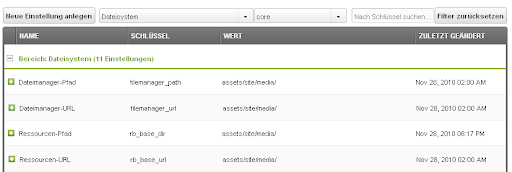
          I had the same problem and I solved it in the system settings (sry for the german UI, but I don’t change for a post =D):


          use the filter "filesystem" and specify the settings you see in the screenshot. When you now open the Modx-Browser, the initial directory is the one you specified, so far so good. I also have the "missing thumbnail"-problem but I think in my case it’s the missing ImageMagick Module in PHP...(I have to ask my hoster...) if you know where your ImageMagick you can specify it in a stetting called "setting_phpthumb_imagemagick_path_desc"
            • 20407
            • 82 Posts
            I cannot thank you enough, lluuuk! You’re my messiah, saviour and hero! Changing those settings did the trick.