We launched new forums in March 2019—join us there. In a hurry for help with your website? Get Help Now!
    • 8168
    • 1,118 Posts
    Hi - just upgraded a site to 2.6.5 after major hacking.

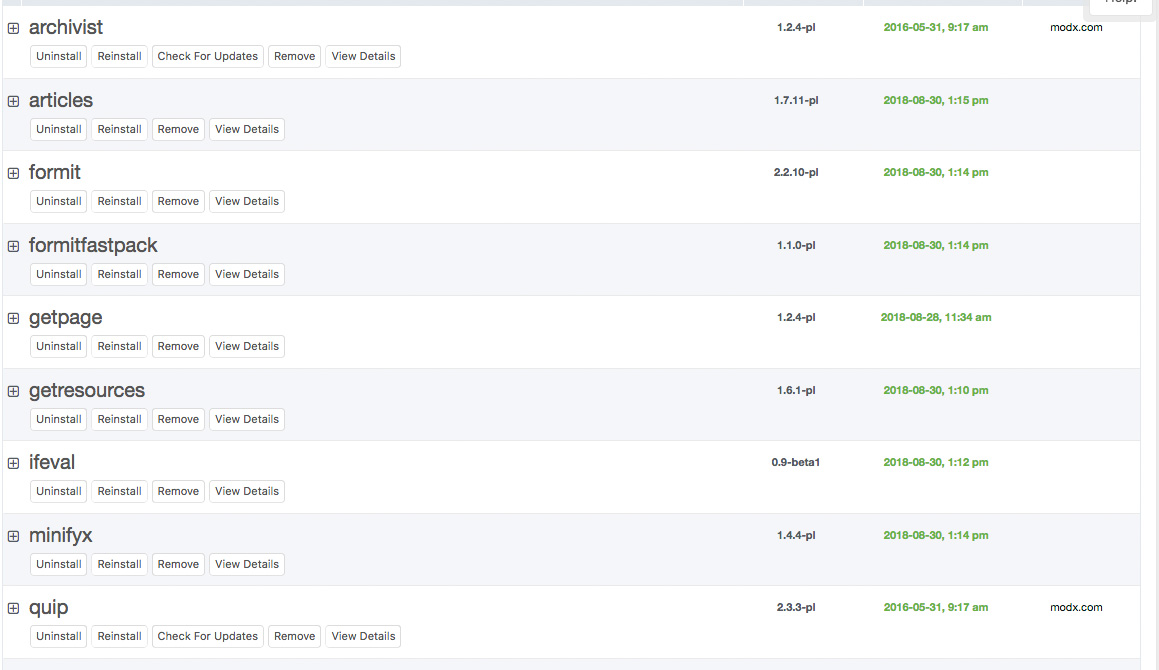
    Site running ok now, but when I try and update the extras - they all appear in the list, but with now CHECK FOR UPDATES option and I know some are out of date and need updating... If I try and REINSTALL I get errors like below:

    Could not copy /public_html/core/packages/getpage-1.2.4-pl/modSnippet/67422e5e412b20f869e1164ca3c2a7ce/0/ to /public_html/core/components/getpage
    Could not resolve vehicle for object of class modSnippet; criteria: Array ( [name] => getPage ) 


    Is this a permissions thing?
      • 8168
      • 1,118 Posts
      Any ideas anyone???
        • 3749
        • 24,544 Posts
        Make sure your core/components directory is writable.
          Did I help you? Buy me a beer
          Get my Book: MODX:The Official Guide
          MODX info for everyone: http://bobsguides.com/modx.html
          My MODX Extras
          Bob's Guides is now hosted at A2 MODX Hosting
          • 36582
          • 463 Posts
          Had this recently and it turned out to be a completely empty workspaces table and also one where the path in the workspaces table was wrong
            Web site design in Nottingham UK by Chris Fickling http://www.chrisficklingdesign.co.uk
            • 8168
            • 1,118 Posts
            Quote from: BobRay at Aug 29, 2018, 06:17 PM
            Make sure your core/components directory is writable.

            Permissions are fine - that's the odd thing...
              • 8168
              • 1,118 Posts
              Quote from: chrisandy at Aug 30, 2018, 03:15 AM
              Had this recently and it turned out to be a completely empty workspaces table and also one where the path in the workspaces table was wrong

              Ok - will look into that.. thanks
                • 8168
                • 1,118 Posts
                OK... update... If I click to reinstall - that seems despite the error to work... and checking the extras website they all seem up to date.. I have have no check for updates option in the manager - e.g. as below screenshot:

                  • 3749
                  • 24,544 Posts
                  Quote from: dubbs at Aug 30, 2018, 04:48 AM
                  Quote from: BobRay at Aug 29, 2018, 06:17 PM
                  Make sure your core/components directory is writable.

                  Permissions are fine - that's the odd thing...

                  Ownership?
                    Did I help you? Buy me a beer
                    Get my Book: MODX:The Official Guide
                    MODX info for everyone: http://bobsguides.com/modx.html
                    My MODX Extras
                    Bob's Guides is now hosted at A2 MODX Hosting
                    • 8168
                    • 1,118 Posts
                    Quote from: BobRay at Aug 30, 2018, 11:08 PM
                    Quote from: dubbs at Aug 30, 2018, 04:48 AM
                    Quote from: BobRay at Aug 29, 2018, 06:17 PM
                    Make sure your core/components directory is writable.

                    Permissions are fine - that's the odd thing...

                    Ownership?

                    Has the same value as all the other folders... this is very odd!
                      • 3749
                      • 24,544 Posts
                      Yes, it is. I can't think of anything else that would cause that.
                        Did I help you? Buy me a beer
                        Get my Book: MODX:The Official Guide
                        MODX info for everyone: http://bobsguides.com/modx.html
                        My MODX Extras
                        Bob's Guides is now hosted at A2 MODX Hosting